RDC Design GroupRDC Design GroupRDC Design GroupRDC Design Group
Call Us
  • 3D Rendering
    • 3D Product Rendering
    • What Is 3D Product Rendering
    • 3D FAQs
  • Web Services
    • Web Design
    • Web Development
    • Speed Optimization
  • Internet Marketing
    • SEO AEO Services
      • Search Engine Optimization
      • Answer Engine Optimization
      • Technical SEO
      • SEO AEO Content Strategy
      • Local SEO Optimization
      • Geographic SEO
      • Link Building Authority
    • PPC SERVICES
  • Other Services
    • Logo Design
    • Graphic Design
    • Motion Graphics
  • Portfolio
  • Discover
    • About
    • FAQs
    • Blog
  • Contact
3d packaging
November 4, 2026

How Does Website Speed Affect SEO and Conversions?

  • Posted By : admin/
  • 0 comments /
  • Under : Web Development, Website Speed Optimization

A great-looking website can still lose potential customers if it takes too long to load. Whether someone is browsing your services on their phone or trying to submit a contact form, delays can interrupt the experience and make it harder for them to take the next step.

Website performance matters for both search visibility and conversions, but speed is only one piece of the puzzle. Here’s how loading performance affects SEO, what Google’s Core Web Vitals actually measure, and where businesses should focus their optimization efforts.

What Is Website Speed, and Why Does It Matter for SEO?

Website speed describes how quickly a page displays useful content and responds to visitors. It affects the experience people have once they reach your website. Search engine optimization (SEO) helps relevant pages become discoverable in search results; performance is one part of the broader technical and user-experience picture.

Speed is only one part of SEO. Helpful content, relevant information, and a clear site structure also matter. However, a slow website can make it harder for visitors to enjoy your content and use your services.

How Does Website Speed Affect SEO?

1. Improves Page Experience

Visitors want to find information without waiting. When a page loads quickly and responds well, people can start reading and browsing sooner.

A smooth page experience also makes it easier for users to explore other pages. As a result, your website can better support your SEO goals.

2. Supports Mobile Users

Many people browse websites on mobile devices, sometimes using slower connections. Therefore, you should test website performance on mobile as well as desktop.

Compress large images, reduce unnecessary scripts, and ensure that important content appears quickly. These changes can make your website easier to use.

3. Supports Search Visibility

Google uses Core Web Vitals in its ranking systems, but there is no single “perfect speed score” that guarantees better rankings. Relevant, helpful content remains essential. Improving slow or unstable pages can support a better experience while removing technical friction.

Search engines also need to crawl and understand your pages. Clear navigation, working links, and a logical website structure support this process.

What Are Core Web Vitals?

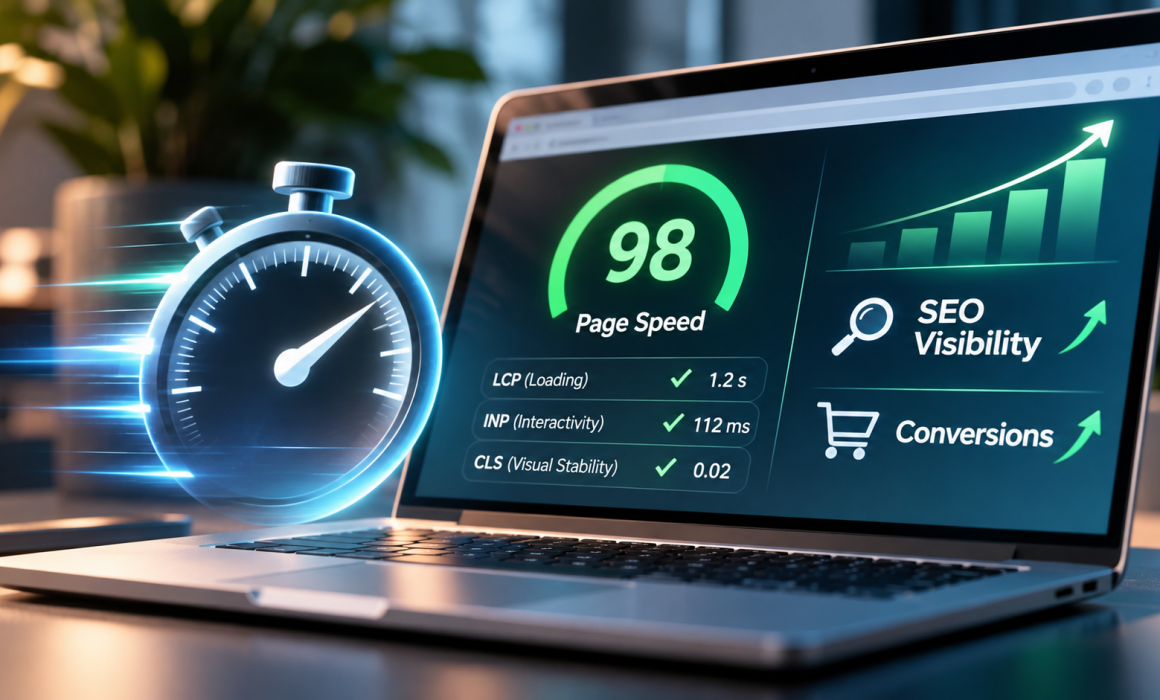
Core Web Vitals are Google’s user-experience metrics for loading, responsiveness, and visual stability. The following “good” thresholds are evaluated at the 75th percentile of real-user page visits:

  • Largest Contentful Paint (LCP): 2.5 seconds or less — when the largest visible content element appears.
  • Interaction to Next Paint (INP): 200 milliseconds or less — how quickly the page responds to user interactions.
  • Cumulative Layout Shift (CLS): 0.1 or less — how much visible content unexpectedly moves.

These targets help website owners identify problems that affect visitors. You can use Google PageSpeed Insights and Search Console to review performance.

How Does Website Speed Affect Conversions?

Website conversions happen when visitors complete an action, such as buying a product, submitting a contact form, or requesting a quote.

A slow website can create frustration at important moments. For example, shoppers may leave a product page if images take too long to appear. Similarly, potential clients may abandon a form that freezes or responds slowly.

A faster website can make browsing and buying easier. However, conversions also depend on pricing, design, trust, content, and the quality of your offer.

For service businesses, a fast and clear website can help visitors explore services and contact your team with less effort.

Common Reasons Why Websites Load Slowly

Several issues can affect website performance:

  • Large images: Uncompressed images take longer to load.
  • Too many plugins: Extra plugins can add scripts and slow down pages.
  • Heavy JavaScript: Large scripts can delay loading and user actions.
  • Slow hosting: Limited server resources can increase response times.
  • Poor caching: Without caching, the server may repeat work unnecessarily.
  • External tools: Chat widgets and tracking scripts can add delays.

Before making changes, test your website to find the main causes of slow performance.

How to Improve Website Speed and SEO

You can often improve website performance without rebuilding your entire site. Start with the issues that affect your most important pages.

1. Optimize Images

Resize images to fit their display areas and use modern formats such as WebP or AVIF where suitable. Compress files while keeping them clear.

Also, avoid lazy-loading the main image visitors see immediately. Load images further down the page only when needed.

2. Remove Unnecessary Code

Review unused plugins, scripts, and styles. Minifying CSS and JavaScript may also help reduce file sizes.

However, test changes carefully to ensure your website features continue to work correctly.

3. Use Caching

Caching stores copies of website resources so browsers and servers do not need to recreate everything on each visit. Proper caching can reduce delays and improve page loading.

4. Choose Reliable Hosting

Your hosting service affects server response times, uptime, and available resources. If your site remains slow after basic improvements, review your hosting plan.

5. Test Performance Regularly

Use Google PageSpeed Insights to identify opportunities on individual pages. In Google Search Console, review Core Web Vitals reports when sufficient real-user data is available. Lab tests are useful for diagnosis, while field data helps you understand what actual visitors experience.

Test both mobile and desktop, and compare results over time. This helps you understand whether your changes are working.

How to Measure Whether Improvements Help

Record baseline Core Web Vitals and important conversion actions before making changes. After updates, compare mobile and desktop performance alongside engagement and conversion data over a meaningful period. Better speed can reduce friction, but any increase in leads or sales should be measured rather than assumed.

For example, a large hero image may delay meaningful content, while a heavy third-party form script may make it harder for visitors to submit an inquiry. The best fix depends on what the page actually does and how people use it.

Rather than chasing a perfect performance score, prioritize pages that matter most to your business: your homepage, high-traffic service pages, key landing pages, and contact or checkout flows. Review real-user performance where available, identify the largest bottlenecks, and fix the issues most likely to affect visitors.

Improve Your Website Performance With RDC Design Group

If your website feels slow, performs poorly on mobile, or makes important actions harder than they should be, we can help you evaluate the experience and identify practical improvements.

A fast website should also be easy to navigate, clearly communicate what you offer, and make it simple for visitors to get in touch. At RDC Design Group, we approach website design and search optimization as connected parts of the customer experience.

Ready to improve your website? Contact RDC Design Group to talk about your goals. Learn more about our search engine optimization services.

Frequently Asked Questions

01. Does website speed affect Google rankings?

Yes. Google uses Core Web Vitals in its ranking systems, but speed is not a substitute for relevant, helpful content. Improving performance is most valuable when it also makes the website easier to use.

02. Can website speed improve conversions?

A faster website can reduce delays and make it easier for visitors to browse, shop, and submit forms. However, better speed does not guarantee more sales or enquiries.

03. What is a good website loading speed?

For Core Web Vitals, aim for an LCP of 2.5 seconds or less, an INP of 200 milliseconds or less, and a CLS of 0.1 or less.

04. Can I improve website speed without a redesign?

Yes. Image compression, caching, code cleanup, and better hosting may improve performance without requiring a complete redesign.

05. How often should I check website performance?

Review performance after major website changes and monitor important pages regularly. Monthly checks are a useful starting point for many business websites.

RDC Design Group – 10 Essential Elements Every Small Business Website Needs
September 15, 2026

10 Essential Elements Every Small Business Website Needs

  • Posted By : admin/
  • 0 comments /
  • Under : SEO, Web Design, Web Development

A small business website is more than an online brochure. It is often the first place potential customers visit to learn about your business, explore your services, and decide whether to contact you. 

A successful website should look professional, work well on every device, load quickly, and make it easy for visitors to take action. You do not need dozens of pages or complex features. Instead, focus on the right small business website essentials that build trust and turn visitors into customers. 

Whether you are creating a new website or updating an existing one, this small business website checklist covers 10 essential elements that can help your website better support your business and your customers. 

1. A Clear and Professional Homepage 

Your homepage creates the first impression of your business. Visitors should be able to understand what you do, who you serve, and why they should choose you within a few seconds. 

Use a clear headline that explains your service or value. Avoid vague statements that sound good but do not actually tell visitors what your business offers. 

Your homepage call to action should also make the next step obvious, whether that means Get a Quote, Book a Consultation, or Contact Us Today. 

Keep the design clean and focused. A well-organized homepage makes it easier for visitors to understand your business and find the information they need. 

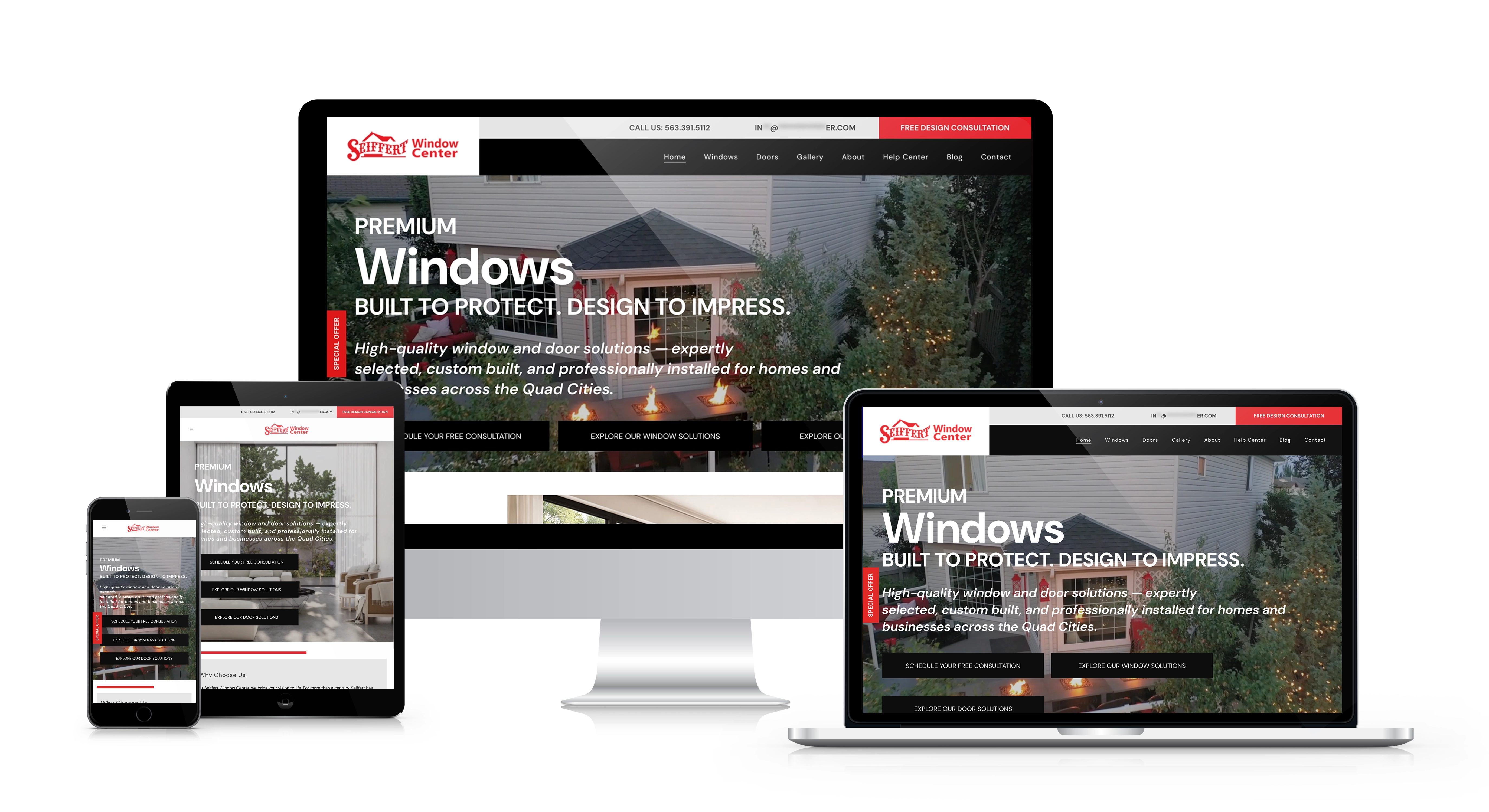
RDC Design Group Website Design Website Developmenet Windows and Doors Website – Responsive Layout

2. Simple Website Navigation 

A small business website may use a simple menu with pages such as: 

Good navigation helps visitors find information without confusion. 

  • Home 
  • About 
  • Services 
  • Reviews 
  • Blog 
  • Contact 

Following website navigation best practices means using clear labels that visitors immediately understand. For example, “Services” is usually easier to understand than a creative phrase that makes users guess where the link will take them. 

Simple navigation is also an important part of website user experience. When people can quickly find what they need, they are more likely to stay on your site, explore your services, and contact your business. 

3. Mobile-Friendly Responsive Web Design 

Your website needs to work well on smartphones, tablets, laptops, and desktop computers. 

Responsive web design allows your website to adjust to different screen sizes. Visitors should be able to read your content, tap buttons, complete forms, and navigate your site without zooming or struggling. 

Mobile usability is especially important for local businesses. Many people search for products and services from their phones while they are away from home or work. 

When it comes to website design for small business, mobile performance should be considered from the beginning. Test your website on different devices and screen sizes, paying particular attention to menus, buttons, forms, images, and page speed. 

4. Clear Calls to Action 

Your website should guide visitors toward the next step. 

A call to action tells visitors what you want them to do. Depending on your business, this might be: 

  • Request a Quote 
  • Schedule an Appointment 
  • Call Now 
  • Book a Consultation 
  • Get Started 
  • Shop Now 

Place important CTAs where visitors naturally make decisions. This can include the homepage, service pages, testimonials, and contact page. 

Avoid using too many competing CTAs. Choose one primary action for each page and make it easy to find. 

5. Detailed Service Pages 

Your homepage provides an overview, but your service pages should give visitors the details they need. 

Create dedicated pages for major services when appropriate. Explain what you offer, who the service is for, what customers can expect, and why your business is qualified to help. 

Strong service pages can also support your SEO strategy. They give search engines more context about your services and create opportunities to target relevant search terms. 

Most importantly, write for your customers. Use straightforward language, answer the questions they are likely to have, and focus on the problems your business can solve. 

6. Customer Reviews and Trust Signals 

People want to know they can trust a business before spending money or reaching out. 

Add genuine customer reviews, testimonials, case studies, certifications, awards, professional memberships, or examples of your work where appropriate. 

Specific testimonials are especially helpful. Instead of simply saying that your company is “great,” strong customer feedback explains what you did, what the experience was like, and how it helped. 

The right trust signals can make potential customers feel more comfortable taking the next step. 

7. Fast Website Performance 

A professional design means little if your website takes too long to load. 

Large images, unnecessary scripts, excessive plugins, and poor hosting can all slow down your website. A slow website creates a frustrating user experience and may cause visitors to leave before they ever see what your business has to offer. 

Optimize your images and remove features that do not add real value. Keep your website lightweight, efficient, and focused on the user. 

Website speed should be part of your business website design process from the beginning, not something you worry about after launch. 

8. Easy-to-Find Contact Information 

Make it easy for customers to contact you. 

Your website should clearly display relevant information such as: 

  • Phone number 
  • Email address 
  • Contact form 
  • Business address 
  • Hours 
  • Service areas 

Your phone number or primary contact button can appear prominently in the header, while additional contact details can also be included in the footer and on your contact page. 

Keep contact forms simple. Ask for the information you actually need. A long or complicated form can discourage potential customers from completing it. 

9. Basic SEO Foundations 

SEO helps potential customers find your business through search engines. 

Your website should have clear page titles, useful meta descriptions, descriptive URLs, proper headings, internal links, optimized images, and helpful content. 

You should also create content around the questions your customers ask and topics that are relevant to your products or services. 

Avoid creating multiple pages that target the exact same keyword and search intent. Doing so can lead to keyword cannibalization, where pages on your own website compete with one another in search results. 

SEO is most effective when it is considered as part of your website strategy rather than something added after the site has already been built. 

10. A Website Designed for Conversion 

Getting visitors to your website is only part of the goal. You also want those visitors to become leads or customers. 

This is where website conversion matters. 

A conversion could be a phone call, contact form submission, appointment, quote request, purchase, or email signup. 

Every important page should have a clear purpose and make the next step easy for visitors. Clear messaging, strong calls to action, trust signals, simple forms, and intuitive navigation can all help reduce friction and improve your chances of turning website traffic into actual business. 

Ready to Improve Your Small Business Website? 

Your website should do more than look good. It should communicate your value, build trust, attract the right visitors, and turn those visitors into customers. 

If your current website is outdated, difficult to use, or not generating enough leads, it may be time for a redesign. 

Ready to build a website that works harder for your business? Contact RDC Design Group today to discuss your website goals and discover how a strategic, user-friendly website can help your business grow. 

Small Business Website FAQ 

01. What should a small business website include? 

A small business website should include clear messaging, simple navigation, service information, contact details, calls to action, customer reviews, mobile-friendly design, fast performance, and basic SEO. 

02. How many pages does a small business website need? 

There is no fixed number. A simple business may only need a few core pages, while businesses with multiple services or locations may need more. Every page should serve a clear purpose. 

03. Why is responsive web design important? 

Responsive web design allows your website to adapt to different screen sizes. It makes your website easier to use on smartphones, tablets, laptops, and desktop computers. 

04. How can a website increase conversions? 

Improve your website conversion rate by making your offer clear, adding trust signals, using strong CTAs, improving mobile usability, and making it simple for visitors to contact or buy from you. 

05. Does every small business need a blog?  

Not necessarily. A blog can help answer customer questions, demonstrate your expertise, and attract relevant search traffic, but only if you can publish useful content that supports your business goals. Quality is more important than publishing content simply for the sake of having a blog. 


RDC Design Group – Custom Web Development and When You Need It
August 11, 2026

What Is Custom Web Development and When Do You Need It?

  • Posted By : admin/
  • 0 comments /
  • Under : Web Design, Web Development

Custom web development gives businesses the ability to build a website around their specific goals, customers, processes, and requirements. Unlike a basic template, a custom website can be designed and developed to meet the actual needs of the business rather than forcing the business to work within the limitations of a pre-built solution. 

That doesn’t mean every business needs a fully custom website. For many companies, an existing platform or framework can provide everything they need. But when your website requires unique functionality, complex integrations, specialized workflows, or greater flexibility, custom development can open up possibilities that aren’t always available with an off-the-shelf solution. 

In this guide, we’ll explain what custom web development means, how it works, when you may need it, and what to consider when comparing a template versus custom website. We’ll also look at what to expect from a professional web development company and how the right custom solution can support your business as it grows. 

What Is Custom Web Development? 

Custom web development is the process of building website features and functionality specifically around the needs of a business. 

Instead of relying entirely on pre-built themes, plugins, or standardized features, developers can create the code, structure, integrations, and functionality needed for a particular project. 

A standard website often starts with an existing theme or template. That can be a perfectly good approach when the requirements are relatively straightforward. 

Custom website development, on the other hand, gives you the flexibility to create a solution around the way your business actually operates. 

That might mean developing a unique customer portal, interactive product experience, custom checkout process, specialized calculator, advanced search feature, or integration with other business systems. 

Custom development also gives you more control over how different parts of your website work together. Instead of trying to fit your processes into the limitations of a template or combination of plugins, the website can be developed to support the processes that are important to your business. 

RDC Design Group Web Design Web Development – Pet MatRx

Signs Your Business Needs Custom Website Development 

Not every business needs a fully custom website. In fact, one of the first things a good development partner should determine is whether custom development is actually necessary. 

However, there are several signs that a standard website or your current platform may no longer be enough.

1. Your Website Needs Unique Features

If your website needs functionality that isn’t available within your current platform, custom development may be the right solution. 

Maybe you need a calculator, customer portal, product configurator, interactive tool, specialized search system, or unique checkout process. 

Sometimes an existing plugin or third-party solution can handle the job. Other times, trying to force several different plugins and systems to work together creates more problems than it solves. 

Custom development allows the feature to be built around your actual requirements.

2. Your Business Has Complex Workflows

Some businesses have processes that are simply too complex for basic website tools. 

For example, a service company might need a customer to select a service, choose several options, receive pricing, schedule a date, submit information, and complete payment. 

Trying to handle those steps through disconnected forms or systems can create unnecessary work for both the customer and your internal team. 

Custom development can connect these steps and create business website workflows that better reflect how your company operates. 

The result can be a smoother customer experience while also reducing repetitive manual work behind the scenes.

3. Your Website Needs to Connect With Other Systems

Most businesses don’t operate through their website alone. 

You may already use a CRM, ERP, inventory management platform, accounting software, scheduling system, marketing platform, payment processor, or other business technology. 

Getting those systems to communicate with your website can require API integrations and custom programming. 

Custom development can help connect these systems so information can move between them more efficiently, reducing duplicate data entry and making the website a more useful part of your overall business operations.

4. Your Current Website Is Too Slow

Website performance problems often become more noticeable as a site grows. 

Too many plugins, scripts, third-party tools, large files, or unnecessary features can make a website slower and increasingly difficult to manage. 

In some situations, custom development can help create a cleaner technical structure and eliminate unnecessary functionality. 

That said, custom development doesn’t automatically make a website fast. Performance still depends on good planning, quality code, hosting, images, databases, third-party tools, and ongoing maintenance. 

The goal should be to build only what the website actually needs and build it well.

5. Your Business Is Growing

A website that works perfectly well for your business today may not be able to support where you’re headed next. 

As your company grows, you may add more products, services, employees, customers, locations, technology, or internal processes. 

Custom web development can provide a stronger foundation for that growth by giving you more flexibility to expand the website over time. 

That doesn’t mean building every feature you could possibly need on day one. It means thinking ahead so today’s decisions don’t unnecessarily limit tomorrow’s opportunities. 

Benefits of Custom Web Development 

When there’s a real business need behind it, custom development can offer several advantages. 

More Flexibility 

One of the biggest benefits is flexibility. 

Instead of selecting from a limited set of pre-built options, you have more control over how the website looks, functions, and interacts with your other systems. 

The goal isn’t customization simply for the sake of being different. It’s having the ability to build the right solution when standard options can’t meet the requirements. 

Better User Experience 

A custom website can be designed around the way your customers actually interact with your business. 

That can improve website UX by removing unnecessary steps and making important actions easier to complete. 

For example, an online service company could create a booking experience around the specific questions customers need to answer rather than forcing them through a generic form. 

The design can support that functionality as well. Professional web design allows the visual experience and user interface to be developed around the brand, content, functionality, and customer journey rather than being restricted by a pre-designed template. 

Greater Scalability 

A custom website can also be developed with future growth in mind. 

Again, that doesn’t mean you should build every possible feature from the beginning. Doing so can add unnecessary cost and complexity. 

Instead, a good development team can create a solid technical foundation that allows additional website features and functionality to be added as the business grows and new needs emerge. 

Better Integration Options 

Custom development can make it easier to connect your website with other systems your business already relies on. 

This can reduce repetitive work and improve the way information moves through your organization. 

For example, a customer might submit a form on your website and have that information automatically sent to your CRM. An e-commerce order might need to communicate with an inventory or fulfillment system. A customer account might need to retrieve information stored somewhere outside the website. 

The right integrations can turn a website from a standalone marketing tool into a more connected part of your business. 

More Control 

With custom coding, your business has greater control over the website’s features and technical structure. 

This can be especially valuable for companies with specialized requirements or processes that don’t fit neatly into an off-the-shelf solution. 

It can also reduce your dependence on finding a separate plugin or third-party product every time you need the website to do something new. 

How the Custom Web Development Process Works 

A professional web development company should follow a clear process before anyone starts writing code. 

At RDC, development starts with understanding what the website actually needs to accomplish. Jumping straight into development without understanding the business, users, requirements, and technical considerations is a pretty good way to make a project more complicated than it needs to be. 

Step 1: Discovery 

The first step is understanding your business. 

The development team should learn about your goals, customers, existing technology, current website, pain points, and the problems you’re trying to solve. 

This is also the time to identify the required functionality and determine whether custom development is actually the best solution. 

Step 2: Planning 

Once the requirements are understood, the team can create a plan for the website. 

This may include defining functionality, integrations, user flows, page structure, technical requirements, and how different systems need to work together. 

Good planning upfront can prevent expensive changes and unnecessary development later. 

Step 3: Design 

The design stage focuses on the visual experience and how users will interact with the website. 

Designers create layouts and interfaces that support your brand while making the website intuitive and easy to use. 

Design and development should work together throughout this process. A beautiful website still needs to function properly, and sophisticated functionality still needs to be easy for people to understand and use. 

For projects that require a completely unique visual experience, creative web design can give the design team the freedom to create around the brand and functionality rather than the restrictions of an existing template. 

Step 4: Development 

Once the strategy and design are established, developers build the website. 

This is where custom coding and web programming become central to the project. 

The development team creates the required functionality, connects third-party systems, builds integrations, establishes the technical structure, and brings the approved designs to life. 

Step 5: Testing 

Before launch, the website should be thoroughly tested. 

That includes checking functionality, forms, integrations, responsive behavior, browsers, devices, and other project-specific requirements. 

Testing helps identify problems before your customers do. 

For websites with complex functionality, this stage can be especially important because one feature or integration may affect several other parts of the website. 

Step 6: Launch and Support 

Once testing is complete and the website is approved, it’s ready to launch. 

But launch shouldn’t be the end of the relationship. 

Websites need updates, security monitoring, performance checks, software maintenance, and improvements over time. Your website may also need to evolve as your business, customers, and technology change. 

Template Versus Custom Website: Which Is Better? 

There isn’t a universal winner in the template versus custom website decision. 

A template can be a great option for a straightforward website with relatively standard requirements. It can provide an established foundation without requiring every element to be built from scratch. 

Custom development makes more sense when the website needs functionality, integrations, workflows, or design flexibility that a standard solution can’t reasonably provide. 

The right question isn’t, “Is custom always better?” 

It’s, “What does this website need to accomplish?” 

If a standard solution can meet your goals effectively, there may be no reason to introduce additional complexity. If your business is constantly working around the limitations of a template, plugins, or disconnected third-party systems, custom development may provide a much better long-term solution. 

Choosing the Right Web Development Company 

Choosing the right development partner can have a major impact on the success of your project. 

Look for a web development company that takes the time to understand your business and requirements before recommending a solution. 

A strong development partner should also be able to explain technical concepts in straightforward language. You shouldn’t need to be a developer to understand what is being built, why it’s being recommended, or how it will support your business. 

Experience matters, but so does communication. 

Custom development often involves important decisions about functionality, integrations, technology, scalability, and ongoing support. You want a team that can help you understand those decisions instead of simply disappearing into the code. 

Custom Web Development in Philadelphia, PA 

For businesses looking for web development in Philadelphia, PA, working with a local development partner can have its advantages. 

At RDC Design Group, we’re based in the Philadelphia area and have worked with businesses across a wide range of industries, both locally and nationwide. 

But location shouldn’t be the only reason you choose a development company. 

Whether your development team is around the corner or across the country, what matters most is their experience, process, communication, technical capabilities, and ability to understand what your business actually needs. 

Is Custom Web Development Right for Your Business? 

Custom web development can give your business more control, flexibility, and room to grow. But it should solve a real problem—not add complexity just because custom sounds better. 

If your current website can’t support the features your customers need, your team is spending too much time working around technical limitations, or your systems don’t communicate the way they should, a custom solution may be worth considering. 

The same applies if your business has outgrown a template and needs more sophisticated business website workflows, integrations, or functionality. 

Ready to build a website around your business instead of forcing your business to fit a template? 

Contact RDC Design Group today to discuss your project, goals, and website requirements. We’ll help you determine whether custom web development makes sense for your business and develop a strategy around what you actually need. 

FAQs About Custom Web Development 

01. What is custom web development? 

Custom web development is the process of creating website features, functionality, integrations, and technical solutions specifically for a business. It provides greater flexibility than relying entirely on standard templates and pre-built solutions. 

02. Is custom website development better than using a template? 

It depends on what your website needs to accomplish. A template can work very well for a straightforward website with standard requirements. Custom website development is more useful when you need unique features, integrations, complex workflows, professional web design, or greater control over how the website operates. 

03. What is the difference between professional web design and custom web development? 

Professional web design focuses primarily on creating a unique visual and user experience around a brand rather than starting with a pre-designed template. Custom web development focuses on the technical functionality, programming, integrations, and systems that make the website work. 

The two often work together on fully custom website projects. 

04. How long does custom web development take? 

Project timelines vary depending on the size and complexity of the website. A relatively simple custom website may take less time than a large platform involving multiple integrations, advanced functionality, or complex business workflows. 

Discovery, planning, design, development, testing, revisions, and content can all affect the overall timeline.

05. Can custom development improve website performance? 

It can. A well-built custom website can avoid unnecessary features, plugins, and code. 

However, performance also depends on factors such as hosting, images, databases, third-party scripts, content, code quality, and ongoing maintenance. Custom development by itself doesn’t guarantee a fast website. 

06. Does custom development work with existing software? 

Yes. Developers can often connect a website with existing business tools through APIs and other integrations. 

This may include CRMs, ERP systems, inventory software, scheduling platforms, payment processors, marketing platforms, and other business technology. The exact approach depends on the systems involved and what information needs to move between them. 

07. What website features and functionality can be custom developed? 

The possibilities vary widely depending on the project. Custom development can include customer portals, calculators, product configurators, advanced forms, search tools, booking systems, checkout experiences, account functionality, third-party integrations, internal workflows, and other specialized features. 

The important part is determining which functionality actually provides value to the business and its customers. 


Blog Categories

  • All 11
  • Web Design 6
  • SEO 4
  • Web Development 3
  • 3D Rendering 3
  • Website Speed Optimization 1

Related Posts

3d packaging

How Does Website Speed Affect SEO and Conversions?

Nov 4, 2026
RDC Design Group – What Is 3D Packaging Rendering and Why Do Brands Use It

What Is 3D Packaging Rendering and Why Do Brands Use It?

01. What is 3D packaging rendering used for?
Nov 2, 2026
RDC Design Group – What Is 3D Product Rendering and How Does It Work

What Is 3D Product Rendering and How Does It Work?

Oct 15, 2026

Ready to Elevate Your Brand?

  • Web Design
  • 3D Rendering
  • SEO
  • Digital Marketing
Schedule a Consultation